
Composition:
1) Ubuntu Hardy Heron
2) Avant Window Navigator
3) Compiz Fusion
4) Cairo Type Menu
5) Transparent Terminal
6) NTFS Automounting
7) Readjustments on Panels

Composition:
1) Ubuntu Hardy Heron
2) Avant Window Navigator
3) Compiz Fusion
4) Cairo Type Menu
5) Transparent Terminal
6) NTFS Automounting
7) Readjustments on Panels

So you want to switch to Linux OR dual boot with Windows OR are searching for a suitable distro. Too many distributions, too much confusion. What to do?
Go to:
(1) http://tinyurl.com/9ezxa [ Zegenie Studios ]
(2) http://tinyurl.com/fp4zp [ polishlinux.org ]
and take the test. Results are out in a giffy, and you will know which distro you belong to. My results were ‘Fedora’ and ‘Mandriva’ respectively. Nevertheless, I love Ubuntu ( Came 2nd in both tests ) and it Rocks ! 🙂 Have Fun !
I got in trouble with Win XP when I used Wine ( on Ubuntu 8.04 ) to install a software on my mounted windows NTFS partition. An ambitious approach, but i took the risk to see what will happen. I don’t quite love my mistress (WinXP) you see 😉 It completed the installation and everything seemed fine.
As expected, there were issues:
1) Win XP will boot and then stall at the desktop wallpaper
2) No icons or taskbars are seen
3) Nothing works
4) Ctrl + Alt+ Del will work and the Task Manager will Appear
5) Same issues with Safe Mode.
6) Restoring registry didn’t work either.
( by commanding ‘ scanreg /restore ‘ at command prompt )
Since safe mode didn’t work either, I knew system files have gone bonkers. So what did I do? Of course I thought of formatting, and thats kinda usual for Windows users. Then i recalled a previous incident where my GRUB was totally distorted by a fresh installation of Windows ( A very jealous mistress indeed ). Of course i prepared myself with all those tools : Super Grub Bootable, UBCD 4 Win, Ubuntu Live CD etc. But it gets messy you know.
Then a thought flashed my mind. Why don’t I just try to repair Windows? Will it or will it not destroy my GRUB? So I just had to try it…
This is what happened
1) WinXP SP2 bootable disk initializes as the PC boots
*2) Then a screen appears, where we have to choose whether we should Repair ( press ‘R’ ) or install WinXP ( press <Enter> )
Note: Now this is the interesting part –> PRESS ENTER. DO NOT press ‘R’.
*3) It will take you to the next screen where it will search for previous installations of Win XP.Your current installation will be highlighted, and the installer will ask you what to do?
It is here where you should choose to REPAIR.
* = Pay special attention to this lines
From now on…it will do the ‘ repairing ‘ work 🙂 Just wait and be patient.
After its done, you will be extremely happy to see your GRUB load as normal as it reboots.
Before formatting Windows, I guess this method is a golden tip to save lotsa time if its not a virus issue etc. Whenever there is a problem with Windows, before you give up, almost always try to REPAIR. It may just be the solution for you…
Tags: ubuntu, windows, Winxp, dual, boot, repair, GRUB, partition, linux,
Note: Ensure you have enabled Extra Visual Effects in the Appearance Preferences
( which is accessible by a Right Click on the desktop –> Change Desktop Background –> Appreaceance Preferences –> Visual Effects )
Download PDF for instructions. Click here.

The Dock Rocks

Talk about user friendly…
Open a whole new world of cool effects. Once Hardy Heron has been setup, open a new terminal window and type
sudo apt-get install compizconfig-settings-manager
When finished, you’ll have a new option under System – Preferences called Advanced Desktop Effects. Here you can tweak the animations for individual window effects as well as enable new features. Below are some of the animations and effects that I have enabled for my Linux box.

Wobbly Windows ( Just drag any window )

The Ring Changer ( *Super + Tab )
*Super = Windows Key

3D Cube Switch ( Control + Alt + Click and hold left mouse + drag to the left/right )

3D Cube Switch ( Control + Alt + Click and hold left mouse + drag to the left/right )

Alt + Tab

Desktop Zooming ( Super + Mouse scroll button up/down )

Cube Unfolded ( Control + Alt + Down Arrow Key )
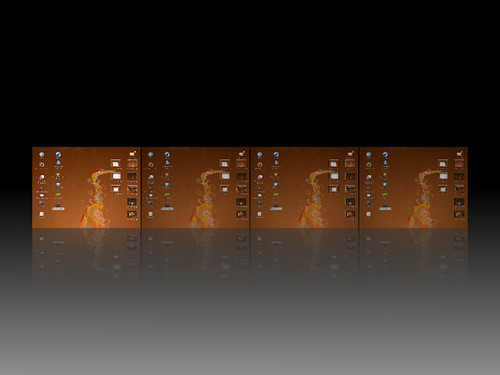
View Desktops ( Super + E )

Paint Fire ( Super + Shift + Press left mouse button and move around )
To clear ( Super + Shift + C )
This is not a screen saver. The Ubuntu Dekstop is still running and I can still use it…

Cool… ( As Above )

Fade any windows – not an issue ( Alt + Mouse scroll button up/down )
After enabling other effects ( based on your choice and taste ) in the Advance Desktop Effect Settings, this are the keyboard shortcuts that maybe of use:
Desktop Effects1 Keyboard Shortcuts
Rotate Cube Mousewheel on Desktop
Switcher2 Alt + Tab
Shift Switcher3 Super + Tab (2 modes: flip and cover)
Ring Switcher Super + Tab – overrides Shift Switcher
Expo Super + E (toggle)
Film Effect Ctrl + Alt + Down Arrow4
SUPER+SHIFT+DRAG LEFT MOUSE = draw fire
SUPER+SHIFT+C = clear fire
CTRL+ALT+DRAG LEFT MOUSE = rotate cube
CTRL+ALT+LEFT ARROW = rotate cube
CTRL+ALT+DOWN ARROW = flat desktop
SHIFT+ALT+UP=initiate window picker
CTRL+ALT+DOWN=unfold cube
ALT+TAB=window switch
SUPER+TAB=flip switcher or ring switcher depending on which is enabled.
ALT+F7=initiate ‘move windows’
SHIFT+F9=water effect
SHIFT+F10=slow animations
CTRL+ALT+D=show desktop
For Grouping and Tabbing:
SUPER+S=Select Single Window
SUPER+T=Tab Group
SUPER+Left=Change Left Tab
SUPER+Right=Change Right Tab
SUPER+G=Group Windows
SUPER+U=Ungroup Windows
SUPER+R=Remove Group Window
SUPER+C=Close Group
SUPER+X=Ignore Group
hold the super button then select the windows you want to group and then hit super+g
Rotate Cube Manually: Ctrl + Alt + Left Mouse Button
Scale Windows: Alt + Shift + Up Arrow
Show/Clear Desktop: Ctrl + Alt + D (toggle)
Snapping Windows : Move a window across workspaces5
Screenshot: Super + Left Mouse Button
Zoom In/Out: Super + Mousewheel
Transparent Window : Alt + Mousewheel
Resize Window : Alt + F8
Move Window : Alt + F7
Add Helper : Super + P
Widget Layer: F9 (toggle)
Water Effects: Shift + F9 (toggle)
Fire Effects: On Super + Shift + Left Mouse Button
Fire Effects: Clear Super + Shift + C
Annotate: Draw Super + Left Mouse Button
Annotate: Start Super + 1
Annotate: End Super + 3
Group: Select Window(s) Super + S
Group: Group Windows Super + T
Group: Ungroup Windows Super + U
Group: Flip Windows Super + Right or Left Arrow
Two Words : UBUNTU ROCKS ! [ AWN and COMPIZ FUSION Rolls 🙂 ]
Cheerz !
So I went digging deeper. What is this all about ?
Linux was the answer to this question.
And whenever I mention this word to some friends, either they get scared and immediately put on a ” this is not for me ” attitude OR will be alienated by the word.
But I don’t blame them, it has always been that only a computer science graduate or a advanced computer user can utter that word. Its not for us. I always was told that too.
But trust me, it isn’t so. 60 ~ 70 % of the internet is running on Linux Systems.
Ubuntu is by far the most user friendly Linux system I have seen. When I surfed http://www.ubuntu.com , I was so touched by its philosophy. They are working day and night for humanity…their core philosophy:
That software should be available free of charge, that software tools should be usable by people in their local language and despite any disabilities, and that people should have the freedom to customise and alter their software in whatever way they see fit.
I mean I couldn’t believe my eyes. And I installed it. I was amazed.
Everything is FREE OF CHARGE. FREE in a sense of FREEDOM and $$$.
Their group is working day and night, to provide us with an essential part of our computing life, The OS. You can download the source code and tweak it anyways you want.
You can even improve upon it and submit for review. I mean how cool is that.
Of course that will take some technical knowledge and know-how, but look at the FREEDOM. No one will come harassing you…and you need not spend THOUSANDS of $$$ in your organization to buy licensed softwares.
Need not worry on where to find Pirated Versions of Windows, Windows validation and all sorts of licensing CRAP etc etc etc. 🙂
Its soo good, that EVERYTHING that you can do in Windows, you can do in Ubuntu.
Documents files, Spreadsheets, Presentations from Microsoft Office can be edited and modified in Ubuntu, using OPEN OFFICE and other OPEN SOURCE softwares.
Currently Microsoft is charging hundreds of ringgit for their OS ( Vista / XP ).
Ubuntu is FREE. I was inspired by this movement and started taking up the Python
Programming language. I did suceed up to a certain extend, and I am proud of it.
Ubuntu is created using the Python programming language.
I am not saying totally do away with Windows. NO. You will take some time getting use to Ubuntu / Linux platforms, but you could always allocate space on your harddrive for a dual boot system. Slowly get use to Ubuntu…and then, if you are satisfied, get rid of Windows. And if you are not, get rid of Ubuntu. OR Keep both.
The choice is yours.
For me, I am currently happy with my dual boot system and am doing fine.
Linux gives me ultimate power over the machine. I mean real POWER.
Infact, I hardly boot into Windows nowdays. Everything is done thru Ubuntu.
I love it.
I am also excited by the $100 OLPC Project. OLPC – One Laptop Per Child
( http://www.laptop.org/ ). Also runs on a Linux based OS ( Known as XO ) which is targeted for education purposes. This will enable the young ones to own and also be exposed to technology at a young age. I mean, its amazing what Linux can do and achieve. Many many other peripherals are using it successfully without you knowing.
Linutop is another project … providing cheap CPUs for the end users.
And so many many others. I wonder what will happen in another 50 years.
There is enough for all of us. As long as the OPEN SOURCE / FREE SOFTWARE movement rules planet earth, greedy ones will always be weary. I foresee a different future altogether…a future where we all will “Ubuntu” the Linux way.
Anyways, I am attaching a snapshot of my desktop below. Check it out.
===============================================================

===============================================================
The background – Official Logo Of UBUNTU
Contribute and Support the OPEN SOURCE / FREE SOFTWARE movements.
SOFTWARES WITH A SPIRITUAL EDGE. Awesome !!!!!!!!!!!!!!!!!!!!!!!!!!!!!!!
V is currently enjoying :
Hans Zimmer & Lisa Gerrard – Now We Are Free ( Gladiator OST )
UBUNTU,
V
P.S. Windows Attacked (some funny ones) :
 TRUTH ROCKS !